
Hosts
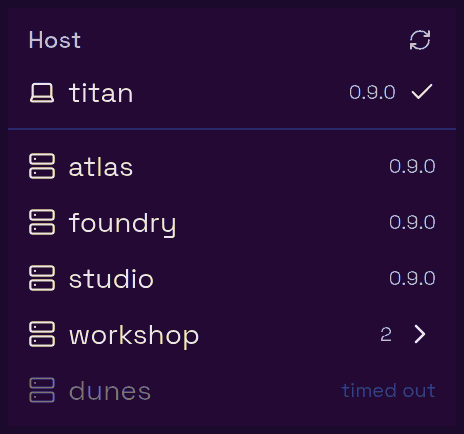
A host is a machine running herdr that lasso can drive. One is always there: local, the machine lasso itself runs on, which the UI and the MCP tools show by its hostname (an MCP client would read "local" as its own machine; the tools take either name). Every other host is an alias from your ssh config. One lasso can therefore front a whole fleet, and each browser tab chooses which machine it is looking at.
Where hosts come from#
lasso reads ~/.ssh/config on its own machine and takes every concrete Host alias in it. Wildcard and negated patterns (*, ?, !) are skipped, since they aren't real targets. Include directives are not followed, so a host declared only in an included file won't appear; declare its alias in ~/.ssh/config itself.
Everything else about the connection comes from your ssh setup, because lasso uses the system ssh binary: HostName, User, ProxyJump, IdentityFile, your agent and known_hosts all apply exactly as they do on the command line. Two things lasso adds:
- No prompts. Probes run with
BatchMode=yes, so a host that would ask for a password or a passphrase fails instead of hanging. Use key-based auth with a key your ssh agent holds. - New host keys are accepted. Probes use
StrictHostKeyChecking=accept-new: a host never seen before is added toknown_hosts, while a host whose key changed is still refused.
When a host is usable#
lasso probes each alias in the background by running herdr status server --json over ssh. A host is selectable when all three hold:
- Reachable: ssh connected and ran the command.
- Running: a herdr server is up there.
- Compatible: its herdr speaks the same protocol as the herdr on lasso's own machine.
Anything else shows greyed out in the host menu with the reason (unreachable, herdr not installed, herdr not running, protocol 21 ≠ 22, ...). A host whose probe is still in flight shows as probing, and one that didn't answer within 30 seconds shows timed out, which means "unknown", not "broken": a sleeping laptop can take that long to wake.
The same ssh call also runs herdr session list --json, so listing a host's herdr sessions costs no extra connection. lasso drives one session per host: the one herdr status server reports there, and on lasso's own machine the socket -herdr-sock names. The others are listed for MCP callers (list_hosts, machine_list) but not driven. A herdr too old to list sessions is still usable; its roster just says why it is missing.
The probe runs at startup, then every 45 seconds. A host that keeps failing is probed less and less often, backing off to once every 15 minutes, so an offline machine doesn't cost a dial every cycle. The refresh button in the host menu ("Re-scan ssh config") re-reads the config and probes every host immediately.
How the host menu groups them#
Several aliases often point at one machine (one per user account, say). The host menu collapses them:
- Alias families. Aliases sharing a prefix before the first
-(box-alice,box-bob, orboxplusbox-bob) form one group namedbox, with one row per member. - Same machine. Other aliases that resolve (via
ssh -G) to the sameHostNameare grouped under that hostname. - Loopback. An alias whose
HostNameislocalhost,127.*or::1is lasso's own machine, so it is listed under the local host rather than as a separate group.
A group of one stays a plain row.
These display groups are unrelated to MCP host groups (lasso mcp-group), which decide which hosts' agents may see and address each other. Those are covered in Agent scope.
A host belongs to a browser tab#
Picking a host in the menu (the server icon in the desktop footer, or Host in the phone's view picker, the input dial's big button) moves that browser tab to the machine: its terminal, its pane list, its file sidebar. Other tabs stay where they are, so two tabs can sit on two machines at once.
- A new tab starts on the default host,
local. - The choice survives a reload of that tab, and you can deep-link a tab to a host with
?host=<alias>in the URL. - On a remote host, the terminal runs
herdr --remote <alias>. It runs on lasso's machine and multiplexes over one ssh connection per host, shared by every tab on it. - Switching back to a host you used recently is instant, because its terminal is kept warm.
lasso watches each host that some tab is looking at. A host nobody has watched for 90 seconds stops being polled, so an idle remote costs nothing. The default host is always watched, since it is where a fresh tab lands.
The sidebar follows the pane, not just the tab#
The Files tree, the file viewer and editor, and the git diff follow the focused pane: its working directory and the machine that directory is on. Usually that is the tab's host. It differs when the pane on screen is really a window onto another machine:
- An ssh attach to herdr. A pane running
ssh <host> herdr agent attach <name>, orherdr --remote <host>, shows a remote agent inside a local pane. lasso recognizes the attach, asks that host's herdr where the attached agent is working, and points the sidebar at that directory on that host. - A herdr machine. herdr can save other machines (
herdr machine add <ssh-alias> --label <name>) and switch its whole client to one of them. lasso reads which machine herdr's client has selected on lasso's own machine and points the sidebar at that machine's focused pane.
Only a herdr attach or a selected herdr machine counts. A plain ssh host shell keeps the local answer, since nothing on either end knows where that shell has cd'd to. The remote must also be a host lasso may drive (an alias in its ssh config). When anything about the hop can't be resolved, lasso falls back to the local answer rather than guess, because a wrong guess would mean an editor saving to the wrong machine.
Two consequences worth knowing:
- An open file keeps the host it was opened on. Focus moving to another pane does not redirect a save.
- Following a pane's work never moves the tab. The terminal, host menu and New dialog still follow the tab's host.
herdr's machine selection is per machine, not per client: two herdr clients on lasso's machine showing different machines share one selection, and the last to switch wins. Only the local host honors it; a tab on a remote host is a standalone herdr --remote client with no machine selection of its own. herdr's saved machines are separate from lasso's host list, which always comes from your ssh config.
What a remote host needs#
| Need | Why |
|---|---|
| A herdr server running, same protocol as lasso's machine | To be selectable at all. |
| Non-interactive ssh from lasso's machine | Probes and connections never prompt. |
The sqlite3 CLI |
Each host's creator settings (repos root, branch prefix, default agent, per-repo setup) live in that host's own ~/.lasso/lasso.db, read and written over ssh with sqlite3. Without it the repo picker is empty for that host and settings writes fail, with an error naming the fix. |
git |
For the diff and branch listings. |
| The SFTP subsystem | For the Files tab, uploads and transcript reads. Standard in OpenSSH. |
The lasso binary does not need to be installed on remote hosts.
Setting up and updating herdr on a host#
The host menu can fix the two most common problems from the UI:
- set up appears on a reachable host with no herdr server running. It runs a provisioning script over ssh that installs herdr if missing (from
herdr.dev/install.sh), writes aherdr.servicesystemd user unit (run through the handoff-safeherdr-servewrapper, see systemd) and enables it, enables lingering so the server survives logout, installs herdr's agent integrations for every agent CLI lasso can launch, and checks that the server came up. It requires a Linux host with systemd. - update appears on a host whose herdr is behind: either an older protocol (incompatible, so it must be updated to be usable) or the same protocol at an older version than lasso's machine. It runs
herdr update --handoffon the host (which moves a running server onto the new binary in place), answering its prompts, and retries undersudo -nif herdr's install directory isn't writable. A protocol-changing update stops that host's running herdr sessions; the button's tooltip says which kind of update it is.
A host whose installed herdr is newer than its running server (herdr's own "server binary stale" state) gets neither button and reads restart needed: an update would report "already up to date". Restart herdr on that host to pick up the new binary. lasso won't restart it for you, since a server it stopped might have nothing to bring it back up.
Hosts and the rest of lasso#
- Agents can be created on any usable host from the New dialog or the
create_agentMCP tool. See Agents. - Themes are pushed to every reachable host's herdr config and agent CLIs unless you turn that off per host. See Theming.
- Notifications watch every reachable host for blocked agents. See Notifications.
- MCP callers see and address hosts within their credential's scope. See Agent scope.
- The shared browser always runs on lasso's machine, whatever host a tab is on. See The shared browser.